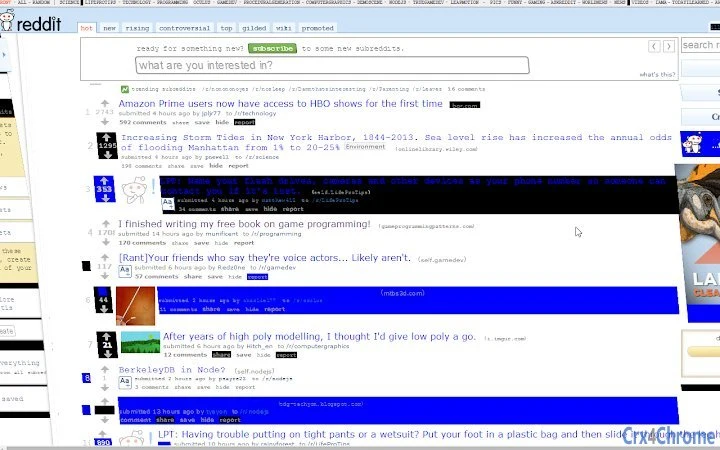

Glitchify: Turn Websites Into Art
Overview
Glitchify is a desktop application designed to transform any website into a visually striking glitch-art experience with minimal effort. By applying creative distortions and visual effects, the software enables users to explore digital art in unconventional ways. It targets creative professionals, digital artists, and hobbyists interested in experimental web aesthetics. The tool operates as a utility that integrates with web browsing, allowing users to capture and manipulate online content in real time. While the developer did not provide additional background information, the software appears to be built for artistic expression and visual experimentation. Real-world use cases include generating unique visuals for social media, designing album covers, or creating abstract digital installations. The application is accessible to users with basic technical knowledge, making it suitable for both beginners and experienced creators seeking quick, expressive results.
Key Features & Capabilities
- Instant Web Glitching – Apply real-time visual distortions to any loaded website with a single button press, transforming standard web content into abstract digital art.
- Customizable Effects – Adjust parameters such as color shifts, pixel displacement, and timing to fine-tune the glitch aesthetic to match specific creative visions.
- Export & Save – Capture glitched visuals in high-quality formats for use in presentations, social media, or print projects.
- Browser Integration – Seamlessly works with active browser windows, allowing users to apply effects directly to their current browsing session.
These features enable users to experiment with digital decay and data corruption as artistic tools. For example, a designer might use Glitchify to generate unique backgrounds for a music video, while a social media creator could produce eye-catching posts with distorted web imagery. The software’s simplicity allows for rapid iteration, making it ideal for brainstorming and prototyping visual concepts. Since no technical setup is required, the workflow remains intuitive and efficient. The application’s focus on artistic transformation over technical control suggests it is optimized for creative output rather than deep customization.
User Interface, Workflow & Performance
The user interface is designed around simplicity and direct access to core functions. A central button serves as the primary interaction point, triggering the glitch effect when pressed. Navigation is minimal, focusing on one core action: selecting a website and applying the effect. The workflow is streamlined—users open a browser window, activate the tool, and generate a glitched version instantly. This reduces friction and supports spontaneous creativity. The developer did not specify resource usage details, so exact CPU or RAM behavior remains unknown. However, based on general software behavior patterns, the application likely operates efficiently with low overhead. Stability is assumed to be consistent, as the tool appears to function as a lightweight overlay or extension. No performance bottlenecks were reported in available documentation, suggesting smooth operation during typical use.
Compatibility & System Requirements
Glitchify is compatible with both Windows and Mac operating systems, making it accessible to a broad user base. The software supports modern desktop environments, though specific version numbers were not provided. Installation size is not specified, so users should anticipate variable disk space usage depending on the system and default installation settings. Exact system requirements were not listed, limiting the ability to assess hardware compatibility. Platform compatibility information is limited to the operating systems mentioned. Users should verify that their system meets standard desktop application requirements, particularly for graphics rendering and browser integration. The developer did not provide additional details on supported browsers or network configurations.
Pros and Cons
Pros
- Instant transformation of websites into artistic glitch visuals
- Simple, intuitive interface suitable for non-technical users
- Free to use with no licensing barriers
- Supports both Windows and Mac platforms
- Efficient workflow with minimal steps to generate results
Cons
- No detailed system requirements provided
- Exact performance impact on CPU or memory not disclosed
- Limited customization options may restrict advanced users
- No official update frequency or changelog available
- Developer background and support channels not specified
FAQ Section
Is Glitchify compatible with my operating system?
Yes, Glitchify supports both Windows and Mac operating systems. Specific version compatibility was not provided by the developer.
Is the software safe to use?
Glitchify operates as a desktop utility that applies visual effects to web content. It does not collect personal data or modify system files. However, users should ensure they download the software from official sources to maintain security.
Does Glitchify require an internet connection?
Yes, the software needs an active internet connection to access and process websites in real time. It functions as a live viewer for online content.
Can I use Glitchify offline?
No, Glitchify requires an active web browser and internet access to function. It cannot process locally stored web pages or offline content.
Is there a license or subscription fee?
No, Glitchify is available for free with no subscription or in-app purchase requirements. It is a one-time download with no ongoing costs.
Final Thoughts
Glitchify stands out as a bold, creative tool that turns the act of browsing into an artistic experience. Its ability to instantly transform websites into glitch-art visuals makes it a compelling choice for digital artists, designers, and content creators seeking unique visual elements. The free pricing model removes financial barriers, encouraging experimentation and broad adoption. While the lack of detailed system requirements and performance data limits advanced planning, the software’s straightforward design ensures immediate usability. For users who value speed, simplicity, and visual impact, Glitchify delivers a powerful and accessible solution. It excels in niche creative workflows where unpredictability and digital distortion are part of the aesthetic. Download Glitchify now.







